Container networking
Overview
If you are self-hosting a model on the same device you are intending to run TrustGraph, you will need to understand how to get TrustGraph to talk to your model service.
If you are intending to self-host a model, you may need to understand how the Docker or Podman networking affects getting TrustGraph to interact with your model service. This is more of an issue if you are intending to host the model on the same device as you are running TrustGraph.
Host networking
Typically when you get two programs to talk to each other, and they are running on the same host, you tell one program, the other is running at address localhost. This is a name for the special address 127.0.0.1. This means: the network traffic doesn’t go out on a physical network, but is communicated to another service on the same device. That only works when the two programs are running directly on the host.
Say you are building a React app, and running it in debug mode and want to interact with it using the browser you might get your browser to talk to the URL http://localhost:5173/. This means, connect to port 5173 on this device. </div>
Container networking
The diagram below illustrates how container networking operates on a host.
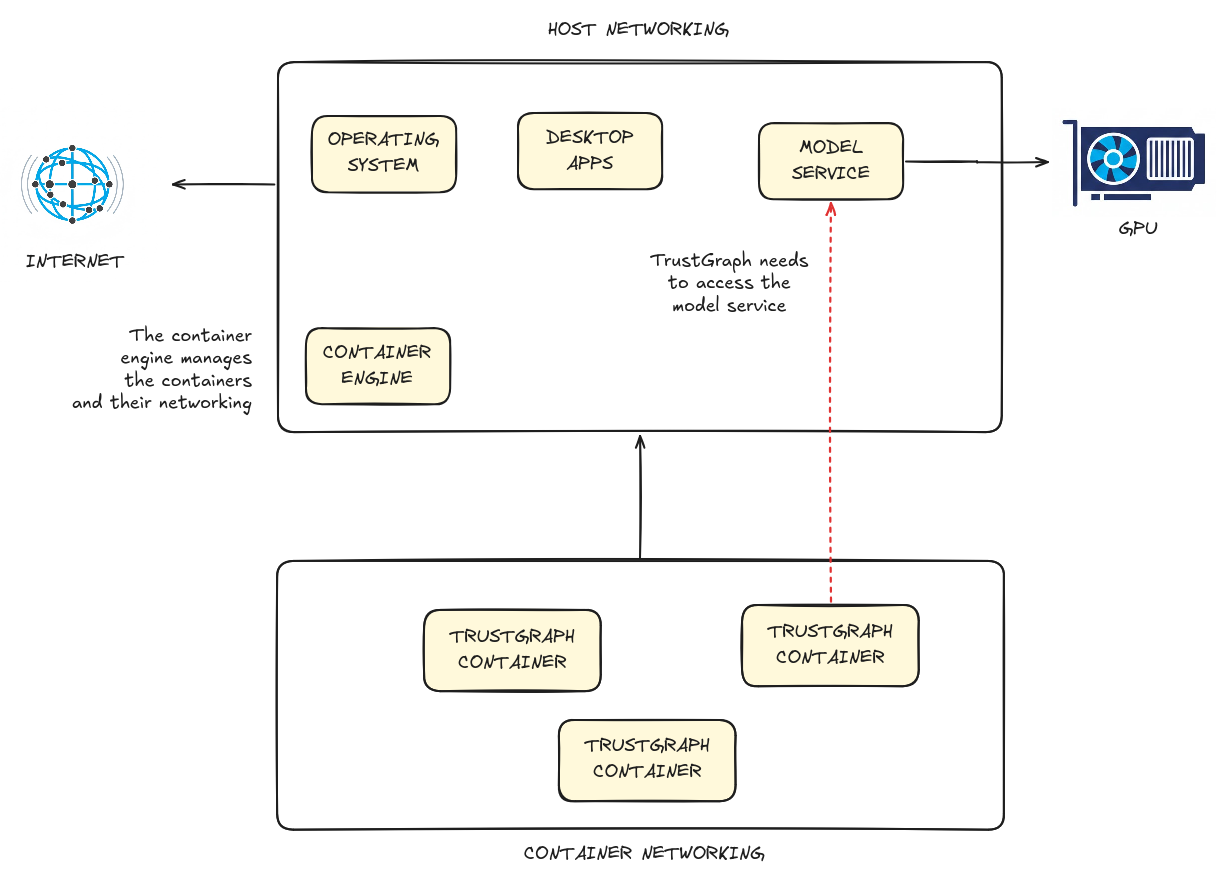
The container engine creates a network space for containers, so that containers appear to talk to each across a network. Containers talk to each other by using their own network address. Containers can also talk to services on the host using a special address for the host. To a container, localhost and 127.0.0.1 direct communication to that same container.
With TrustGraph
This is important because when TrustGraph containers want to talk to a model service running on the host. This is the red arrow on the diagram above. To talk to the model service, you need to give the TrustGraph services the address of the host. The host address address in Podman and Docker are given below.
| Container engine | Host address |
|---|---|
| Podman | host.containers.internal |
| Docker | host.docker.internal |
Example: you run Ollama on the host and want to connect from TrustGraph. On the host, you can access Ollama as http://localhost:11434. From TrustGraph on Docker, you need to access the service as http://host.docker.internal:11434/.
If you are using Windows with WSL also read WSL networking and self-hosted models.