🚧 This page needs work
Note: Needs updating to cover both Pulsar and RabbitMQ as supported pub/sub backends — explain the differences and when you might choose one over the other
Introduction to building with TrustGraph
Overview of resources and capabilities available for builders developing with TrustGraph
Beginner
5 min
- A basic understanding of TrustGraph
- A basic understanding of development terminology tools
Understand the resources and capabilities available for building applications with TrustGraph.
Architecture
TrustGraph provides multiple integration points for building applications.
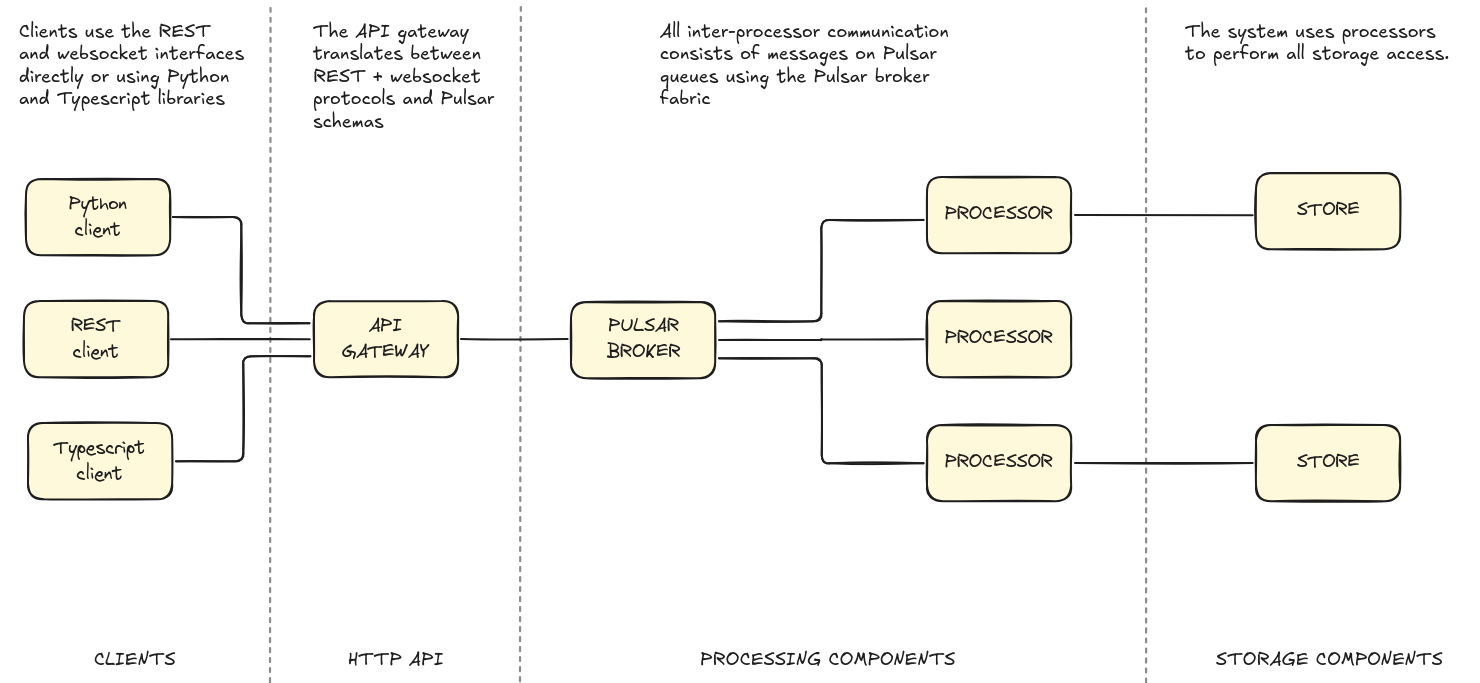
The TrustGraph system is open and complete API-centric. All TrustGraph functionality is built on open APIs, and you can use those APIs to build applications.
Client interfaces
Choose from Python, REST, or TypeScript clients to interact with TrustGraph. All clients connect through the API gateway using REST and WebSocket protocols.
API gateway
The gateway translates between HTTP protocols and Pulsar messaging, handling protocol conversion and message routing. The HTTP API supports REST and websocket interfaces. Most functionality is available in both HTTP request and websocket form. The websocket interface supports greater concurrent use as well as real-time / streaming responses.
Processing components
Processors communicate via Pulsar message queues using the Pulsar broker fabric. This messaging architecture enables scalable, asynchronous processing workflows.
Storage
All data persistence uses dedicated storage processors that interface with the storage layer.
Development tasks
Command-line automation
Use TrustGraph CLI tools to build simple scripts and automation workflows. This allows some simple functionality to be used in scripts. For anything more complex, the Python library offers more integration options.
Command-line tools mostly interact with the API gateway.
→ See Getting started with TrustGraph command-line tools
Client integration
The Python library provides complete coverage of TrustGraph functionality.
Integrate TrustGraph into Python applications using the Python library for document processing, graph queries, and custom workflows.
The command-line utilities largely work by interacting with the API gateway, and are written in Python, so provide some good working examples for how to use the Python library.
→ See Building with the Python API
Web applications
Build browser-based interfaces using the TypeScript libraries with React or other frameworks.
→ See Introduction to the TypeScript libraries
→ See Building a simple application with React and TypeScript
Custom processing
Add new processing components to extend TrustGraph’s capabilities with custom transformations, extractors, or analyzers. Processors are programs which integrate with Pulsar and use all common processing patterns.
New processors can form part of TrustGraph’s dataflow and integrate with existing processing.