Load the ontology
You’ve got an ontology — either generated with a code assistant or the ready-made one. Now load it into TrustGraph and check it looks right.
Import the ontology
In the TrustGraph UI, go to the Workflows page and select Ontology Management.
In the bottom left, click Import OWL/Turtle…. A file dialogue opens — select the .ttl file you created (or the ready-made onboarding.ttl).
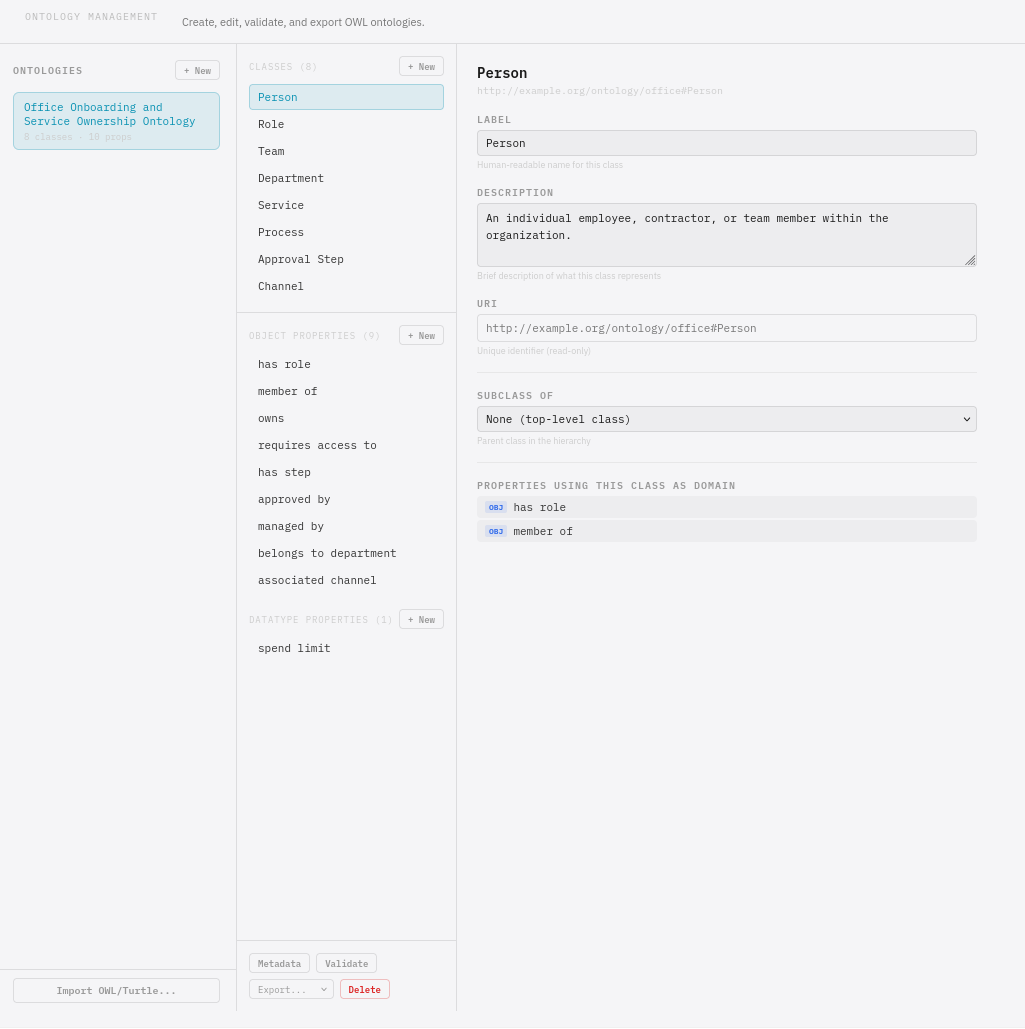
The ontology should load and you’ll see the classes and properties displayed in the viewer.
Check it looks right
Review what was imported:
- Are all the expected classes there? (Person, Role, Team, Department, Service, Process, ApprovalStep, Channel)
- Do the object properties connect the right classes? (hasRole, memberOf, owns, requiresAccess, hasStep, approvedBy, managedBy)
- Are the labels and comments present and readable?
Next
Generate data — create a knowledge graph for the onboarding scenario.